Random 502s behind your load balancer? Check your keep-alive timeout
TL;DR: If a small share of requests (often under 1%) fail with 502 and your app logs show nothing, your app is probably closing idle connections before the load balancer does. The load balancer sends a request down a connection your app just closed, and the request dies. Fix: set your app’s keep-alive timeout longer than the load balancer’s idle timeout. On AWS ALB that means more than 60 seconds. On GCP’s load balancer it means more than 600 seconds.
I’ve run into this bug in production more than once, and it always looks the same: a few 502s a day, spread across every service, no pattern in the app logs, and no errors in the app’s own metrics. It’s easy to ignore until someone’s payment request is one of the unlucky ones.
In this post I’ll show why it happens, reproduce it on a laptop with Node, Python and Go, and fix it with one line in each.
What it looks like
The symptom is a 502 that never reaches your app. Depending on what sits in front of your app, you’ll see one of these:
- nginx:
upstream prematurely closed connection while reading response header from upstream - GCP load balancer:
backend_connection_closed_before_data_sent_to_client - AWS ALB:
elb_status_code=502withtarget_status_code=-in the access log, and theHTTPCode_ELB_502_Countmetric going up
A few things make it confusing:
- Your app has no error for these requests, because as far as your app knows, the request never arrived.
- It gets worse when traffic is low. Idle connections are where the problem lives, and quiet periods have more of them.
- Retrying from the client usually works, so it looks like “network flakiness”.
Why it happens
Opening a new TCP connection for every request is slow, so load balancers keep connections to your app open and reuse them. This is called keep-alive.
Both sides have a timer for idle connections:
- The load balancer closes a connection after it has been idle for X seconds.
- Your app closes a connection after it has been idle for Y seconds.
If your app’s timer is shorter (Y < X), this can happen:
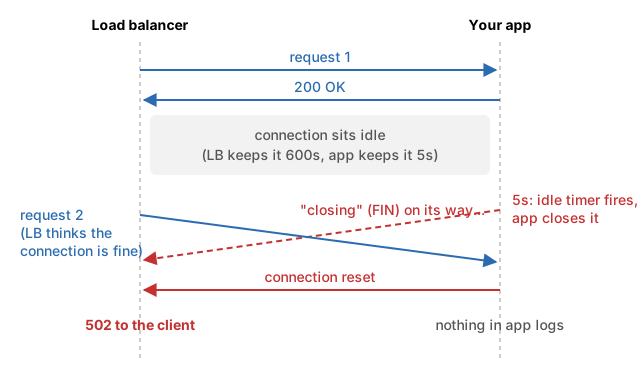
The load balancer thought the connection was still good, because the “I’m closing” message from your app was still on its way. The request went into a connection that was already gone.
It’s a race, which is why only a small share of requests fail. It needs a request to arrive in the few milliseconds when your app has closed the connection but the load balancer doesn’t know yet.
If your app’s timer is longer (Y > X), the load balancer always closes idle connections first. It never sends a request down a connection your app has closed, so the race can’t happen.
The defaults that cause it
Most app servers have a short default. Most load balancers have a long one.
| Component | Default idle timeout | Can you change it? |
|---|---|---|
| AWS ALB | 60s | Yes (1 to 4000s) |
| GCP HTTP(S) load balancer | 600s | No, it’s fixed |
| Node.js (v26 and earlier) | 5s | Yes, server.keepAliveTimeout |
| Python uvicorn | 5s | Yes, --timeout-keep-alive |
| Python gunicorn | 2s | Yes, --keep-alive |
Go net/http |
never closes idle connections | Yes, IdleTimeout |
Two things stand out:
- Node is raising its default from 5s to 65s, but not yet. The change is merged upstream (nodejs/node#62782), yet Node 26.10 still ships with 5s (I checked). Even 65s only fixes AWS ALB (65 > 60), not GCP, where you need more than 600s.
- Go is safe by default. It only breaks if you set
IdleTimeout(orReadTimeout, which it falls back to) to something short.
Reproduce it yourself
I built a small lab so you can see this happen on your own machine. It runs nginx as the load balancer, with a tiny Node, Python and Go app behind it.
client --> nginx (keeps idle connections 600s) --> node / python / goYou need Docker and Python 3. The code is here: github.com/Pushkar-Agnihotri/debug5xx-lab.
./run.sh bugThis starts every app with a 1-second keep-alive timeout, while nginx keeps idle connections for 600 seconds. A small script then sends 100 requests to each app, pausing about 1 second between them, so that nginx keeps reusing connections right as the apps close them.
Here is what I got on my laptop:
http://localhost:8080/go/orders: 3 of 100 requests got 502 (3%)
http://localhost:8080/python/orders: 5 of 100 requests got 502 (5%)
http://localhost:8080/node/orders: 7 of 100 requests got 502 (7%)

What nginx (the load balancer) logged:
  15 upstream prematurely closed connection while reading response header from upstream
Fifteen failed requests, and not one of them shows up in any app’s logs.
Two details I hit while building this:
The lab adds 5ms of network delay. On a laptop, the network is so fast that the race almost never happens. A real network between a load balancer and your app takes a few milliseconds, and that gap is exactly the window where the bug lives. The lab uses tc netem to add 5ms, and then the 502s show up right away.
Node waits an extra second. Node 24 has a setting called keepAliveTimeoutBuffer (1000ms by default). With keepAliveTimeout set to 1000ms, Node actually closes the connection at about 2000ms. That’s why the lab pauses 2 seconds between Node requests. It also means Node’s real idle timeout is a bit longer than the number you configure.
The fix
Make your app’s keep-alive timeout longer than the load balancer’s. In the lab, the apps go to 620 seconds, which is longer than nginx’s 600:
./run.sh fixhttp://localhost:8080/go/orders: 0 of 100 requests got 502 (0%)
http://localhost:8080/python/orders: 0 of 100 requests got 502 (0%)
http://localhost:8080/node/orders: 0 of 100 requests got 502 (0%)
What nginx (the load balancer) logged:
no errorsHere’s the change for each language. Use 65s for AWS ALB (or your ALB’s idle timeout plus 5), and 620s for GCP.
Node.js
const server = http.createServer(app);
server.keepAliveTimeout = 620 * 1000;          // longer than the load balancer
server.headersTimeout = 621 * 1000;            // must be longer than keepAliveTimeout
If you use Express, app.listen() returns this same server object, so set it there.
Python (uvicorn)
uvicorn app:app --timeout-keep-alive 620With gunicorn, use --keep-alive 620.
Go
server := &http.Server{
    Addr:        ":8080",
    Handler:     mux,
    IdleTimeout: 620 * time.Second,
}
If you never set IdleTimeout or ReadTimeout, Go doesn’t close idle connections at all, and you don’t need to change anything.
nginx as your backend
If nginx itself runs behind a cloud load balancer, its keepalive_timeout default is 75s. That’s fine behind AWS ALB (75 > 60) but not behind GCP:
keepalive_timeout 620s;Check your own setup
Walk the request path from the outside in. Each hop must keep idle connections open longer than the hop in front of it.
CDN  -->  load balancer  -->  ingress / proxy  -->  your app
60s or 600s must be longer must be longer- Find your load balancer’s idle timeout (ALB: 60s by default, GCP: 600s fixed).
- Set every proxy behind it (nginx, Envoy, ingress controller) higher than that.
- Set your app server higher than the proxy in front of it.
- Look for the error strings above in your load balancer logs. If they drop to zero after the change, you’ve found it.
What I’d tell my younger self
When a 502 isn’t in the app logs, the app didn’t fail. Something in between gave up. Before digging into your code, look at what the load balancer logged and compare the timeouts on both sides of every connection.
Found a mistake? Open an issue on the lab repo and I’ll fix it.